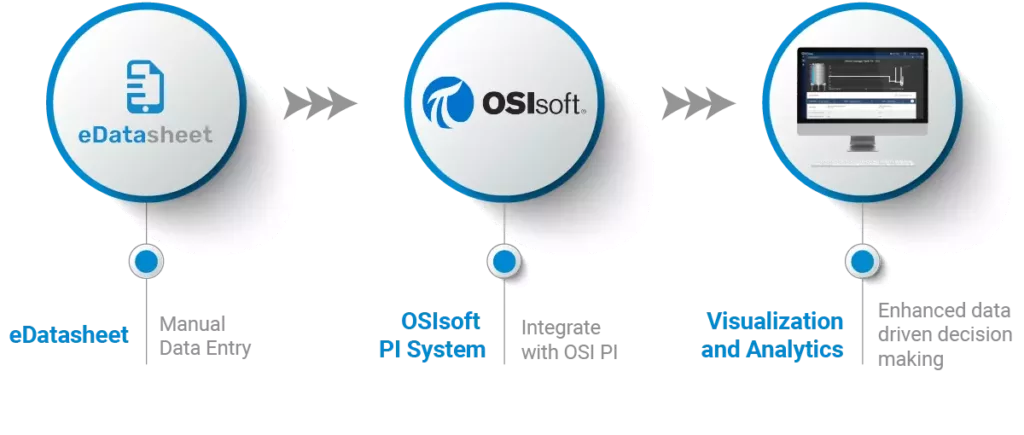
eDatasheet

Manual Data Entry for AVEVA PI System


Direct Entry to PI Tags/AF Attributes

Off the Shelf Solution

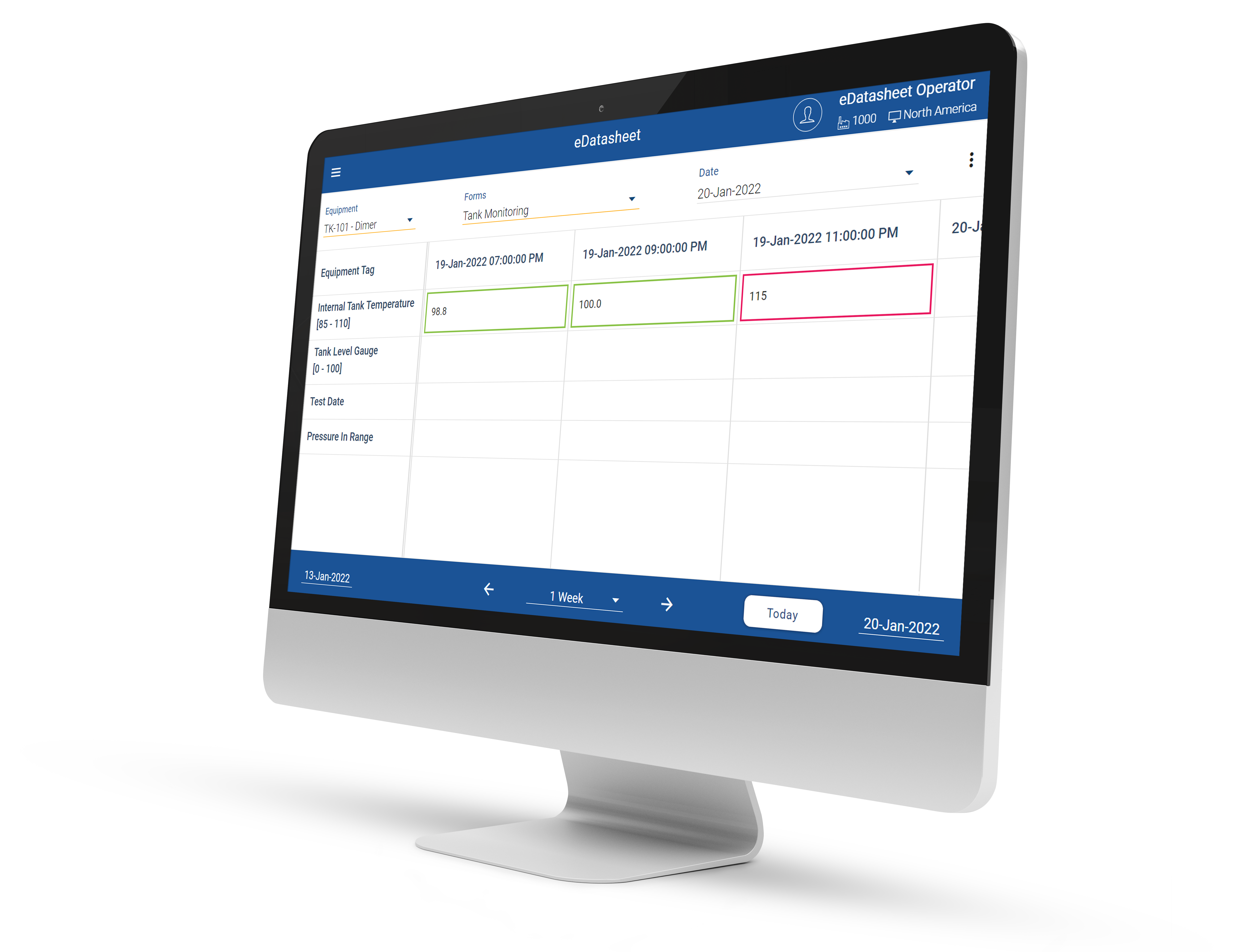
Like a spreadsheet, but easier

Product Features

Function

Intuitive User Interface
Select Preconfigured Text (e.g. Reason Codes)
Enter Free Form Comments

Advanced Deployment

Configurable Security Model
Progressive Web App with Desktop and Mobile Support
Enforced Upper and Lower Limits based on Asset Class

Integration

PI Vision Integration
Save Data Directly to PI Tags or AF Attributes
Fully Compatible with Connectable Historians

Simple Manual Data Entry to PI

Available on both mobile and web applications, the intuitive eDatasheet solution is a powerful and robust tool to meet your operational demands.

Play Video

Advanced Features

SUPPORT AF HIERARCHIES

Yes

UTILIZE AF UNITS OF MEASURE

Yes

ASSET BASED LIMITS

Yes

OPTIONALLY ENFORCE LIMITS

Limits can be enforced, or require comment, or flagged only

ENTER COMMENTS FOR AN ENTRY

Yes, string stored in database and optionally a Tag/Attribute

SUPPORT REASON CODES OR PICK LISTS

Yes, can be stored string or enumerated text

EDIT VALUES ONCE WRITTEN TO PI

Can optionally enable

CommunicatION with PI

Via PI Web API - Requires PSA (PI System Access)

CAN BE EMBEDDED WITHIN PI VISION

Yes

CAN BE USED ON TABLET OR PHONE

Used with any device supporting HTML 5

ENTER VALUES BY COLUMNS OR ROWS

Forms can be transposed with Tags/Attributes are column or rows

SUPPORTS ACTIVE DIRECTORY (LDAP) SECURITY

Yes

ON PREM OR CLOUD BASED

Either

Oil & Gas

Factory B
Chemicals
Chemicals
Life Sciences
Replacement Picture
Food & Beverage
Factory C
Pulp & Paper
Pulp and Paper
And much more
Generic Factory

COTS Solution to Enable Data Entry to PI

Frequently Asked Questions

What is manual data entry software for an industrial data historian?

Manual data entry software allows operators to capture measurements, observations, reason codes, and other human-generated operational information that cannot be collected automatically. OpsTrakker eDatasheet provides structured manual data entry for the AVEVA PI System.

How can operators manually enter data into the AVEVA PI System?

Operators can use OpsTrakker eDatasheet to enter manually collected operational data into the AVEVA PI System through a purpose-built digital interface. This allows human-generated information to become part of the same operational data infrastructure as automatically collected process data.

What is manual data collection in manufacturing?

What is manual data collection in manufacturing?

Manual data collection refers to manufacturing information that must be observed, measured, recorded, or entered by a person rather than automatically collected from a sensor, PLC, control system, or connected device. OpsTrakker eDatasheet digitizes this process and enables manually collected information to be stored within the AVEVA PI System.

Can operators manually enter data into PI Tags and AF Attributes?

Yes. OpsTrakker eDatasheet enables manually collected operational data to be written to PI Tags and Asset Framework (AF) Attributes within the AVEVA PI System.

How can manufacturers eliminate spreadsheets and paper for process data collection?

Manufacturers can replace paper forms and spreadsheets with digital data-entry interfaces connected directly to their operational data infrastructure. OpsTrakker eDatasheet allows operators to digitally capture manual measurements and observations and write that information into the AVEVA PI System.

What is the difference between automated and manual manufacturing data collection?

Automated data collection captures information directly from sources such as sensors, PLCs, control systems, and connected equipment. Manual data collection captures information requiring human observation or input. OpsTrakker eDatasheet helps bring manually collected information into the same AVEVA PI environment as automated process data.

Can manual operator data be displayed in PI Vision?

Yes. Data captured through OpsTrakker eDatasheet can become part of the AVEVA PI System environment and support visualization and analysis through PI Vision.

Can manual data entry software enforce upper and lower operating limits?

Yes. OpsTrakker eDatasheet can use asset-based upper and lower limits to help control manual data entry. Depending on the configuration, values outside defined limits can be flagged or require additional operator information.

Can operators capture reason codes and comments with manufacturing data?

Yes. OpsTrakker eDatasheet supports contextual information such as operator comments and configured reason codes alongside manually entered operational data. This helps explain not only what value was recorded, but also the operational context surrounding it.

How does manual data entry improve the value of an industrial data historian?

Industrial data historians are more valuable when they contain relevant operational context in addition to automatically collected process data. OpsTrakker eDatasheet captures human-generated information that would otherwise remain on paper, in spreadsheets, or outside the historian, providing a more complete operational dataset for visualization, reporting, trending, analytics, and decision-making.

Request a Demo

If you would like to discuss how your business can benefit from eDatasheet, contact us today!

Enhance Manual Data Entry into a Historian with eDatasheet

Contact us for help?

If you would like to discuss how your business can benefit with eDatasheet, contact us today!

Join the OpsTrakker Newsletter for the Latest Updates